StoreAutomator Help Center home page
StoreAutomator.com Book A Demo Submit a request Sign in

Search

  1. StoreAutomator
  2. Knowledge Base
  3. Channel Integrations Management

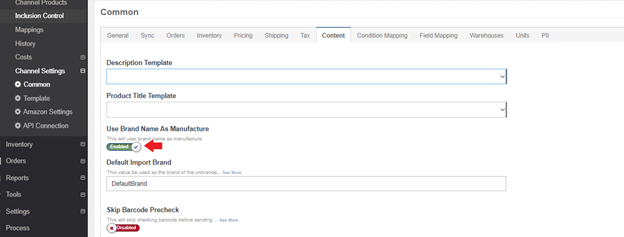
Use Brand Name as Manufacturer Switch

This switch is located at Channel>Channel Settings>Common>Content tab. When this switch is enabled, the manufacturer name will be sent to the remote channel as the brand name. This is useful when you need to provide the manufacturer name as well as the brand name because of the requirements of certain products on the related marketplace.
mceclip0.png

Related articles

  • How to Solve Amazon Error Code 5561
  • How to Enable-Disable Price Update for Specific Products
  • How to Delete All Search Terms from StoreAutomator for Selected Items
  • Remove Discontinued Items Switch
  • Create Brand Profiles

Was this article helpful?

0 out of 0 found this helpful

Articles in this section

  • Store Automator's Syspro Integration for Orders, Tracking and Inventory Updates
  • Netsuite Integration
  • DEAR Integration
  • Essendant Dx Channel
  • How to Set up and Enable B2B2C Operation in StoreAutomator
  • Store Automator's Exenta Integration for Orders, Tracking and Inventory Sync
  • Additional Extensiv Order Manager Settings
  • Shipstation Supplier Settings
  • Setting Up FTP/S3/SFTP Connections
  • How to Connect ShipWorks from Auctane

See all 64 articles

StoreAutomator.com